
Brackets Register A Host Team
The method of payment used by the home team typically dictates the appropriate registration process.
- Host team pays full entry fee, same as all other teams.
- Host team pays PARTIAL entry fee.
- Host team pays their centre through internal billing/assessment
- Host team does not pay to enter tournament.
Host team pays FULL Entry Fee, (same as all other teams)
Scenario A.
- Have the team's coach/manager complete the registration form (like all other teams). Your host team will receive the registration emails, make a payment notification and upload their documents (roster).
- Mark the team as a "Host" team.
- Team will make Payment on website.
Scenario B.
- If your team does not have a coach, manually add the team as a "CONFIRMED" team in the Manage Teams—>Registered Teams page.
- Mark the team as a "Host" team.
- Add the Coach/Manager contact information. (when known)
- Change the team's registration status from "CONFIRMED" back to "ACCEPTED". This will generate fees for the team.
- Team will make Payment on website.
Host Team pays Partial Entry Fee
- Have the team's coach/manager complete the registration form (like all other teams). Your host team will receive the registration emails, make a payment notification and upload their documents (roster).
- Create Registration Coupons for your teams.
- Communicate your Registration Coupon code to your Host Teams.
- Accept the team into your tournament.
- Mark the team as a "Host" team.
- Team will APPLY COUPON code on their Team Self-Management portal in Manage Payments section.
- Team will make a Payment of the balance.
Team Pays your association through Internal Billing/Assessment
- Manually add the team as a "CONFIRMED" team in the Manage Teams—>Registered Teams page.
- Mark the team as a "Host" team.
- Add the Coach/Manager contact information. (when known)
- Collect payment from team.
This method will not generate Tournament fees for the team.
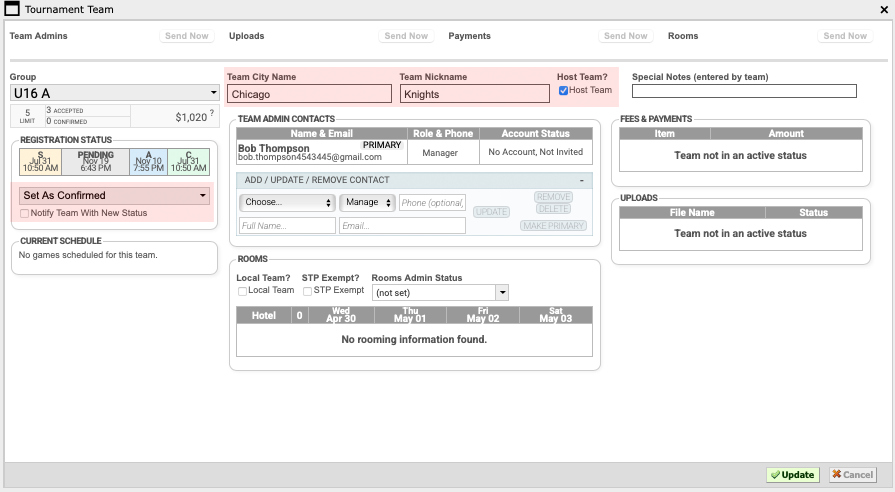
Host Team DOES NOT pay to enter tournament.
- Manually add the team as a "CONFIRMED" team in the Manage Teams—>Registered Teams page.
- Mark the team as a "Host" team.
- Add the Coach/Manager contact information. (when known)
This method will not generate Tournament fees for the team.